Free
For testing and development.
€0
free forever
- 100 prints a month, then printing pauses
- ZPL and raw printer data, no PDF
- 1 agent, unlimited printers
- 30 days of history
- Support through the docs
A print API for cloud software
Your software sends shipping labels, receipts and PDFs to your customers’ printers, with no VPN or open ports. Every job prints at most once by default, and everything runs in Amsterdam.
100 free prints a month · PDF from Start · No payment details needed
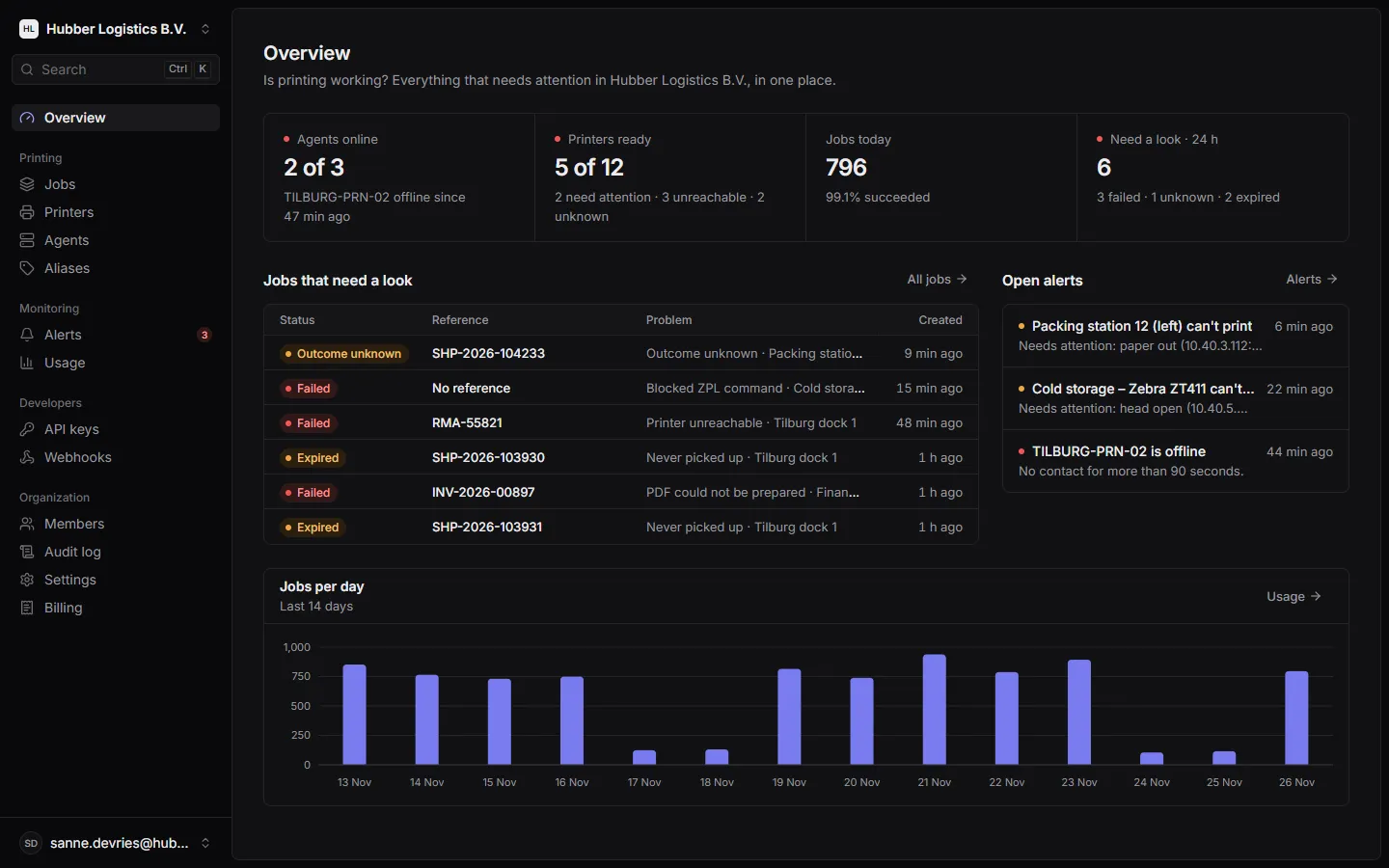
For developers
Send ZPL or a PDF with an idempotency key. If your code sends the same request again, after a timeout for example, you get the existing job back and no second label comes out of the printer.
curl https://api.printsluis.nl/v1/print-jobs \
  -H "Authorization: Bearer $PRINTSLUIS_API_KEY" \
  -H "Content-Type: application/json" \
  -H "Idempotency-Key: order-1042-label" \
  -d '{
    "target": { "alias": "labels" },
    "document": {
      "format": "zpl",
      "content": "XlhBXkZPNTAsNTBeQTBOLDQwLDQwXkZESGVsbG8gZnJvbSBQcmludHNsdWlzXkZTXlha"
    },
    "externalReference": "order-1042"
  }'
var job = await printsluis.PrintAsync(
new SubmitPrintJobRequest(
Target: PrintTarget.ByAlias("labels"),
Document: PrintDocument.Zpl(
"^XA^FO50,50^A0N,40,40^FDHello from Printsluis^FS^XZ"),
ExternalReference: "order-1042"),
idempotencyKey: "order-1042-label");
// Encrypted end to end by default, from SDK 2.0.
Console.WriteLine(job.Status); // QueuedHello from Printsluis
Zebra ZD421 · Packing station 3
queuedQueuedassignedPicked up by agent Warehouse-01submittedToPrinterSent to the printersucceededPrinted, the printer received all of itHow it works
The agent runs at your customer’s site: a Windows service that connects to our API in Amsterdam by itself. It uses ordinary outbound HTTPS, so IT doesn’t have to open anything.
Install the agent on a Windows PC or server and enter the pairing code from the portal. It shows as online within a minute.
Add a network printer by its IP address and port 9100, with no driver. A printer that’s already installed in Windows, you pick from the list.
Create an API key and print to a printer ID or to an alias such as labels.
Reliability
The same shipping label printed twice means two parcels. With a prescription label it’s worse. That’s why Printsluis prints a job at most once by default.
The same key returns the existing job, for as long as that job exists.
If the connection drops while the printer is receiving data, nobody knows for sure whether the label came out. Printsluis doesn’t print it again but marks the job Outcome unknown. Someone checks the printer and reprints if needed.
For Zebra printers on the network, the agent asks for the status before and after every job (~HS). If the paper is out or the head is open, the job waits until the printer is ready again.
If two PCs can reach a printer, the second agent keeps printing when the first one goes down. With aliases and stable printer IDs, your software doesn’t need to know.
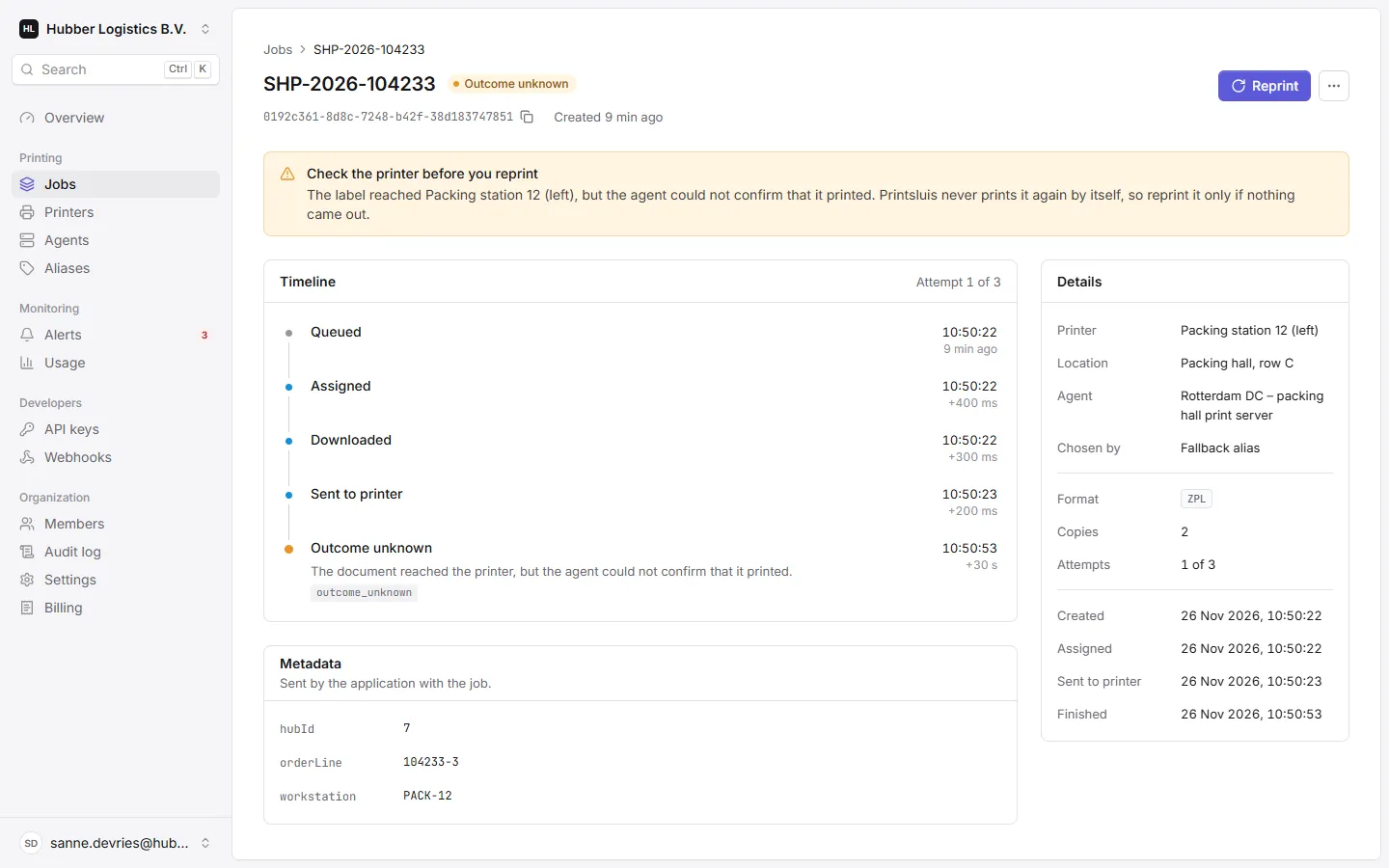
Monitoring
A printer can be online and still be out of paper. Printsluis shows what’s actually going on and emails your admins.
When an agent hasn’t been in contact for three minutes, or a printer reports it’s out of paper or its head is open, the admins get an email.
Your own software gets the same alerts as webhooks, such as agent.offline or printer.needs_attention. Signed with HMAC, and we try up to eight times.
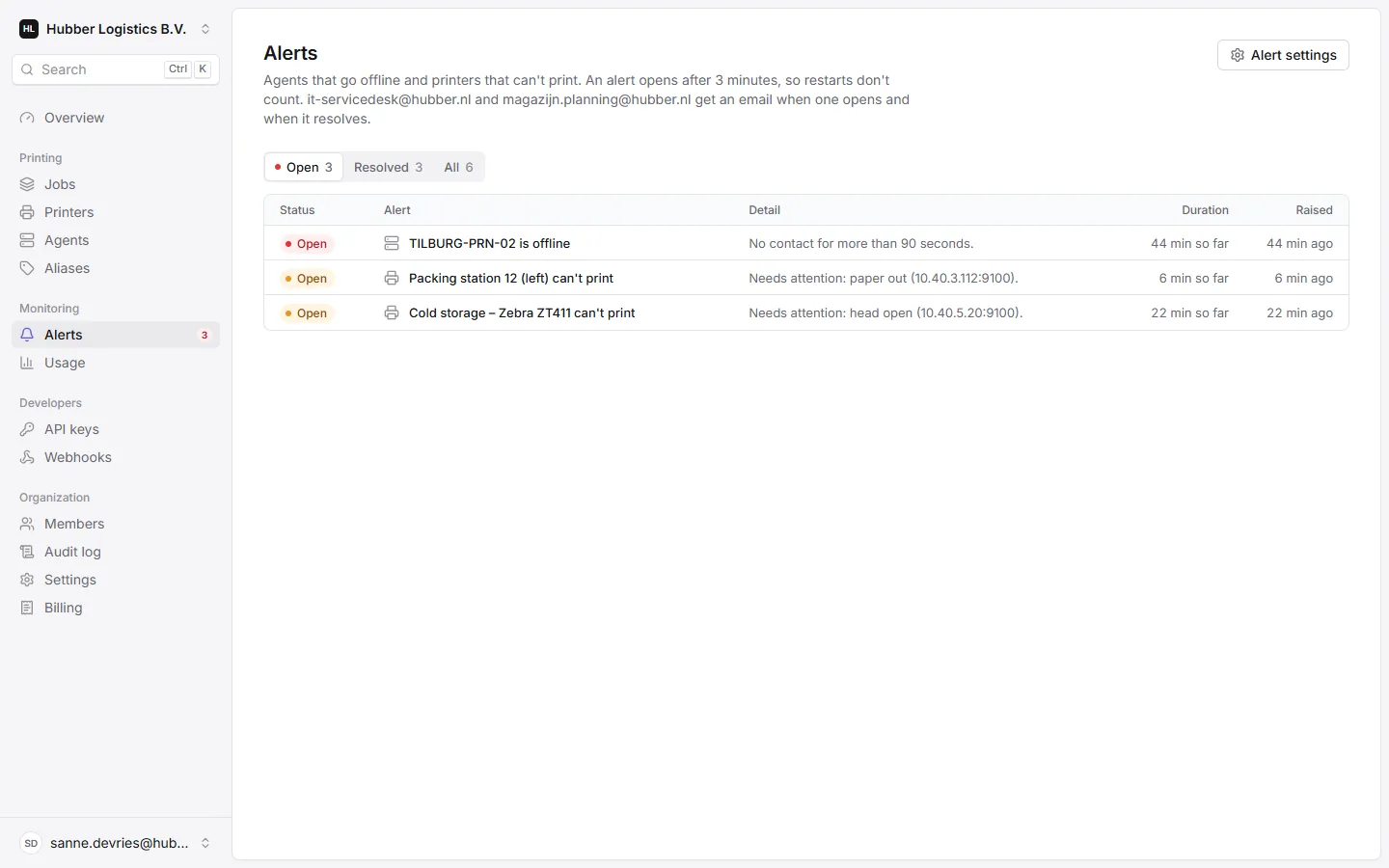
You see every step from queue to printer, and the reason when something fails. Search by your own reference, such as an order number.
The number of prints per day is kept even after the jobs themselves are deleted. You can export it to CSV.
For software vendors
If you build WMS, ERP or shipping software, there’s the Partner plan. Your software sets up a separate environment for each customer through our API.
X-Organization-Id header says which one.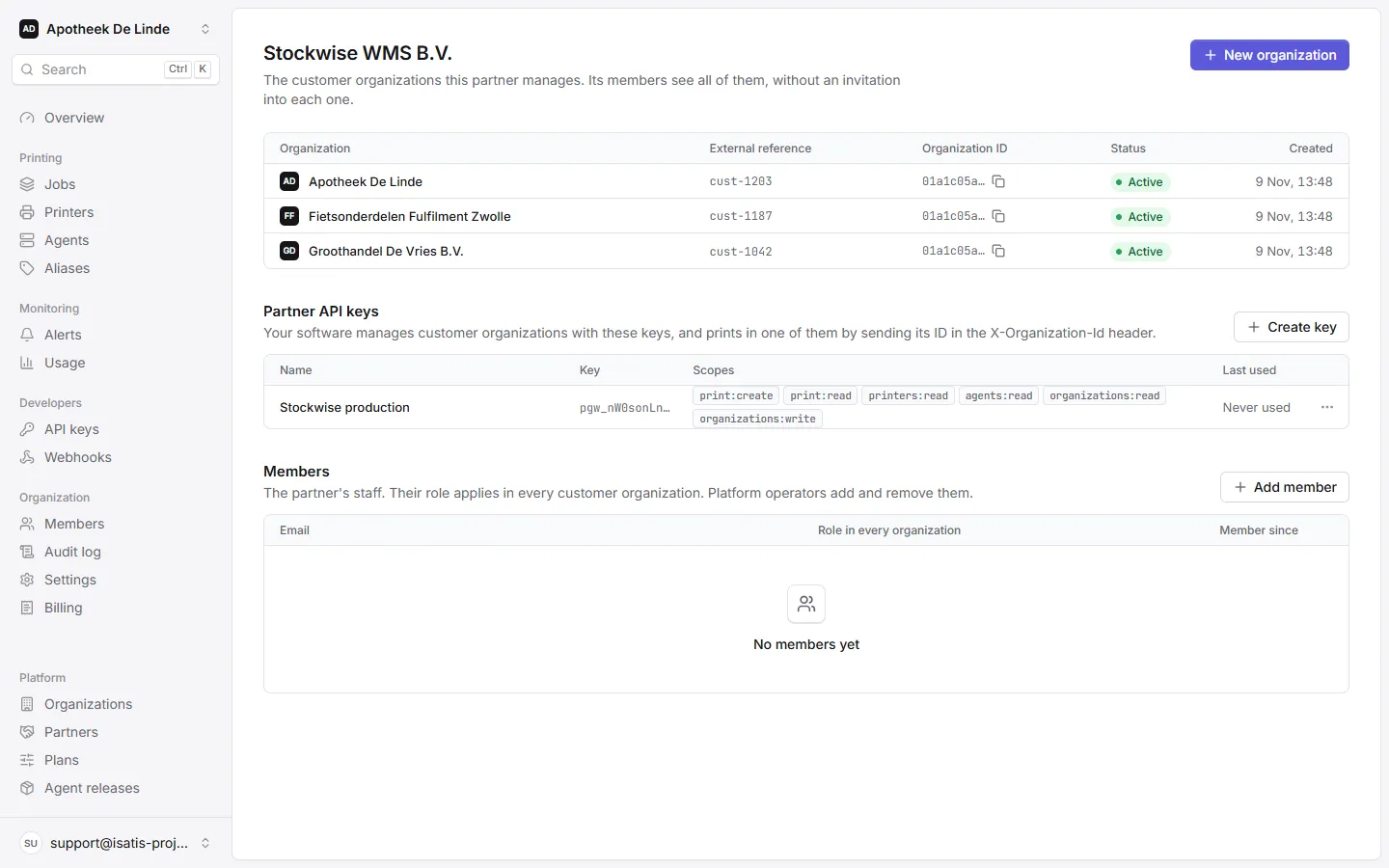
AI assistants
Printsluis has an MCP server. Claude, Copilot, Cursor or your own agents can use it to look up printers, jobs and alerts. They can print as well, but only if you switch that on.
mcp:print scope, and the client asks for confirmation first.claude mcp add --transport http printsluis \
https://api.printsluis.nl/mcp \
--header "Authorization: Bearer pgw_…"Can the printer at packing station 3 print?
list_printers · list_jobs
No, the Zebra ZD421 at packing station 3 has reported it’s out of paper since 09:42. 2 jobs are waiting.
Security
A shipping label carries a name and address. That’s why Printsluis runs in Amsterdam and we don’t keep documents longer than we need to.
The API, database and storage run at Scaleway in Amsterdam.
Documents are stored encrypted (AES-256-GCM) and deleted as soon as the job is done. Their content is never logged.
With the .NET SDK, your software encrypts each document for the agents allowed to print it. We can’t read it ourselves. It’s on by default from SDK 2.0.
The agent opens the connection itself, with a key that can’t leave the machine.
Isatis Projects B.V., the company behind Printsluis, is ISO 27001 certified for developing and supporting custom software.
Who it’s for
Pick and shipping labels on Zebra printers at every packing station. If a PC goes down, a second agent keeps printing.
Labels with personal data that may only be printed once and mustn’t leave the EU.
Shipping labels and packing slips from your webshop or shipping software, on the printer next to the packing table.
Invoices and packing slips as PDF on the office printer and labels on the Zebra, through the same API.
Pricing
Prices are per month and exclude VAT. Pay annually and you get two months free. If you go over your bundle, you keep printing and pay per 1,000 extra prints.
For testing and development.
€0
free forever
For production at one or a few sites.
€24
per month, cancel any month
€20
per month, billed annually (€240 a year)
Or request Start directlyOr request Start directly
For several sites or higher volumes.
€69
per month, cancel any month
€57.50
per month, billed annually (€690 a year)
Or request Pro directlyOr request Pro directly
Choose Pro for failover or a fourth agent. On volume alone, Pro becomes cheaper from about 70,000 prints a month.
For software vendors that print for their customers.
€59
per month, cancel any month
€49.17
per month, billed annually (€590 a year)
For large customers, and partners with hundreds of customers.
On request
for large volumes, with an SLA
A print is one job, whatever its pages or copies: a ten-page PDF counts as one print. Every account starts on Free; upgrading to Start or Pro is done by email for now. A data processing agreement is available on request. On Partner, a customer counts as active if it printed at least once that month.
No. The agent only makes outbound HTTPS connections (port 443) to api.printsluis.nl, and nothing connects to the agent. If the network uses a proxy, you enter it during installation. See Installing the agent.
Zebra and other ZPL label printers are driven directly over port 9100, with no driver. Printers installed in Windows, by USB or network, go through their own driver. That way ordinary office and receipt printers work too, with PDF or raw printer data. The agent runs on Windows 10 or later and Windows Server 2019 or later (x64). Linux and Raspberry Pi come later.
For a Zebra on the network, the printer answered a status query after the job, so it received everything and reports no error. For a Windows printer, the job left the Windows queue without an error. It doesn’t prove that paper actually came out. If the agent can’t be sure, the job becomes Outcome unknown and Printsluis doesn’t print it again.
On Start, Pro and Partner you keep printing and pay per 1,000 extra prints. Only on Free does printing stop at 100 prints, and the portal tells you so.
No, it’s a plain REST API you can call from any language. If you work in .NET, there’s an SDK on nuget.org that also encrypts documents end to end.
Yes. Pair an agent on a test machine and try it next to your current setup. The API differs from PrintNode’s, so you’ll change the call in your software. The differences are on Printsluis or PrintNode.
In Amsterdam, at Scaleway. Documents are stored encrypted and deleted as soon as the job is done. When the outcome is unknown, we keep the document for 24 hours so you can reprint it. Details about the job itself, without the document, are kept as long as your plan says. See Security.
Printers are unlimited on every plan. The number of agents depends on your plan: 1 on Free, 3 on Start, 10 on Pro and unlimited on Partner.
The quickstart takes you from account to printed label. Free, and no payment details needed.